Harnesses and models
An agent system separates the inference engine (the model), the orchestration software (the harness), and the execution target (the environment). Understanding this separation clarifies system capabilities and boundaries.
The three architectural tiers
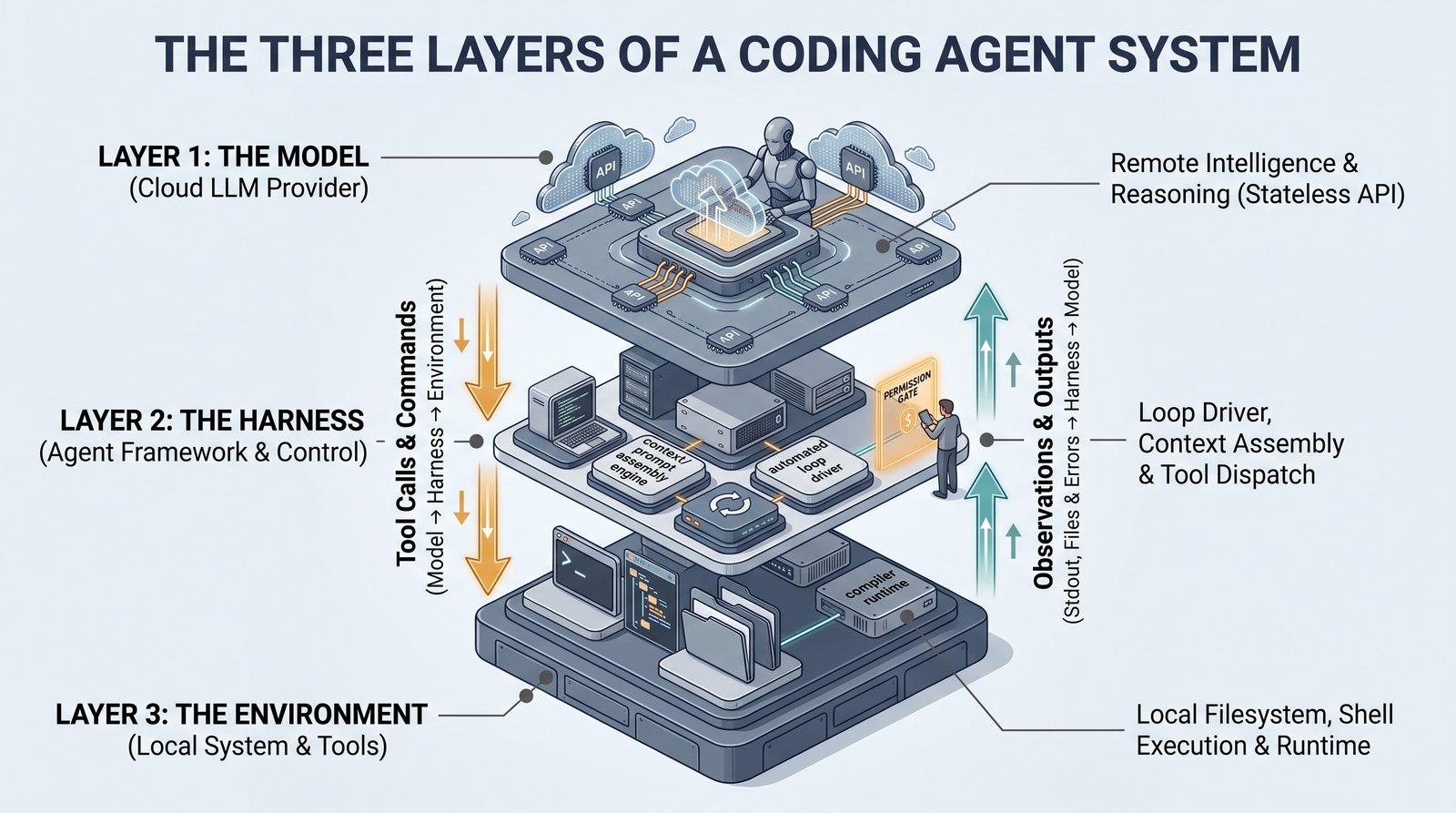
Coding agent architectures separate reasoning, orchestration, and execution into three distinct layers:
| Architectural layer | Role and responsibility | Researcher choice |
|---|---|---|
| Foundation model | The underlying language model that processes context and generates structured tool calls. Because the model is stateless, it only perceives what is passed in the context window. | Provider, architecture tier, and context window size |
| Agent harness | The client application that manages session state, assembles system prompts, invokes tools, prompts for human permissions, and handles error recovery. | Choice of client CLI, IDE extension, or autonomous runtime |
| Execution environment | The computing infrastructure where shell commands execute and files reside. | Local workstation, isolated container, or remote compute cluster (Environment) |
The foundation model evaluates context and proposes actions; the harness enforces boundaries and dispatches commands; and the host environment runs code and returns console output. Harnesses provide different user interface modalities:
- Command-line interfaces (CLIs / TUIs): Lightweight, scriptable, terminal-native harnesses focused on rapid tool dispatch and terminal workflows.
- Code editor integrations & AI-native IDEs: In-editor extensions or dedicated development environments tightly coupled with syntax trees, active files, and inline diffing.
- Desktop agent workspaces: Standalone desktop GUI environments that manage project directories, sandboxed web browsers, multi-file deliverables, and asynchronous task offloading.
An intuitive analogy: the specialist, the apparatus, and the workbench
To understand how these pieces interact, imagine a physical research laboratory:
- The Foundation Model is the Cognitive Specialist in an isolated room: The specialist has deep knowledge of statistics, programming languages, and experimental design, but sits behind soundproof glass without windows or network cables. The specialist cannot directly see your files, touch your keyboard, or run your terminal. The specialist operates strictly as a mathematical function: when handed a sheet of notes (the context window), the specialist reads the text and writes a recommended action on a response card.
- The Agent Harness is the Laboratory Apparatus and Safety Officer: The harness runs locally on your computer. It reads your project files, prepares the briefing notes, hands them through the slot to the specialist, and reads the specialist's response card. If the specialist asks to run a bash command, the harness stops, checks your safety policies or asks for your explicit permission, and runs the command on your behalf.
- The Execution Environment is the Laboratory Workbench: This is your operating system, local disk, shell terminal, and software runtimes (
python,R, compilers). The harness directs actions across this workbench, and the workbench returns raw standard output, error messages, or updated data files.
Distinguishing between these layers prevents common misconceptions. The foundation model never touches your machine directly; the harness provides the model with hands and eyes, while enforcing the boundaries you establish. The exact same foundation model can behave very differently across two different harnesses due to variations in system prompting, tool definitions, and context compaction strategies. Similarly, most harnesses allow switching between multiple model backends.
The tool call lifecycle: how an action executes
To see how the harness and model collaborate, consider what happens under the hood when you give your agent a routine research task, such as: "Inspect raw_data.csv and report the column names."
- Context assembly (Harness to Model): The harness reads your prompt, inspects your current working directory, appends project instructions (such as
AGENTS.md), and lists available tools (e.g.,run_command,read_file). The harness packages this information into text tokens and transmits an API request to the foundation model. - Action proposal (Model to Harness): The model processes the tokens and recognizes that answering requires inspecting the filesystem. Rather than generating conversational text, the model returns a structured tool call request:
run_command(command="head -n 5 raw_data.csv"). The model does not execute this command; it only outputs structured text requesting the action. - Safety evaluation and execution (Harness to Environment): The harness intercepts the tool call. Depending on your configuration, the harness either verifies that the command meets safety rules or halts to prompt you: "Allow running
head -n 5 raw_data.csv? [y/N]". Once approved, the harness dispatches the command to your operating system shell. - Feedback ingestion and answer synthesis (Environment to Harness to Model): The shell runs the command and returns the top five rows from the file to the harness. The harness formats this terminal output as a tool result message and sends it back to the model. With empirical data now in its context window, the model summarizes the column names and delivers a grounded response.
Current landscape
| Ecosystem | Command-line (CLI/TUI) | Desktop GUI / IDE | Background / Autonomous |
|---|---|---|---|
| Anthropic | Claude Code | Claude Cowork (Claude Desktop), Claude Code (VS Code/JetBrains) | Claude Cowork cloud tasks, Claude Code scheduled agents |
| OpenAI | Codex CLI | ChatGPT Work (Desktop), Codex editor integrations | GPT Dots (persistent cloud VM agents), Codex batch workers |
| AWS | Kiro CLI | Kiro Desktop (Kiro IDE) | Kiro Crew (multi-agent workspace), cloud tasks |
| Gemini CLI, Antigravity CLI | Antigravity IDE | Antigravity background tasks (/goal, persistent subagents) |
|
| Open Source / Neutral | pi, Aider, OpenHands CLI | Cursor, Windsurf, Trae, Cline / Roo Code | OpenHands, Devin, SWE-agent, Manus |
System names and interfaces evolve rapidly. Rather than focusing on ephemeral product branding, focus on the structural patterns across these tiers:
- Desktop GUI workspaces vs. code editors: Tools like Claude Cowork and ChatGPT Work broaden the harness surface beyond software development into general analytical and knowledge work. They inspect local directories, orchestrate isolated built-in browsers, and produce rich multi-file deliverables (spreadsheets, slide decks, interactive web pages) while providing visual diff and permission reviews.
- Local interactive runs vs. persistent cloud agents: While early harnesses operated only while the user kept an active terminal or chat window open, systems like OpenAI Dots and Kiro Crew run asynchronously in dedicated sandboxed environments (cloud VMs or daemon containers). They persist memory and context across sessions, monitor repositories or event streams, and notify users only when explicit human sign-off is required.
The spectrum of human supervision
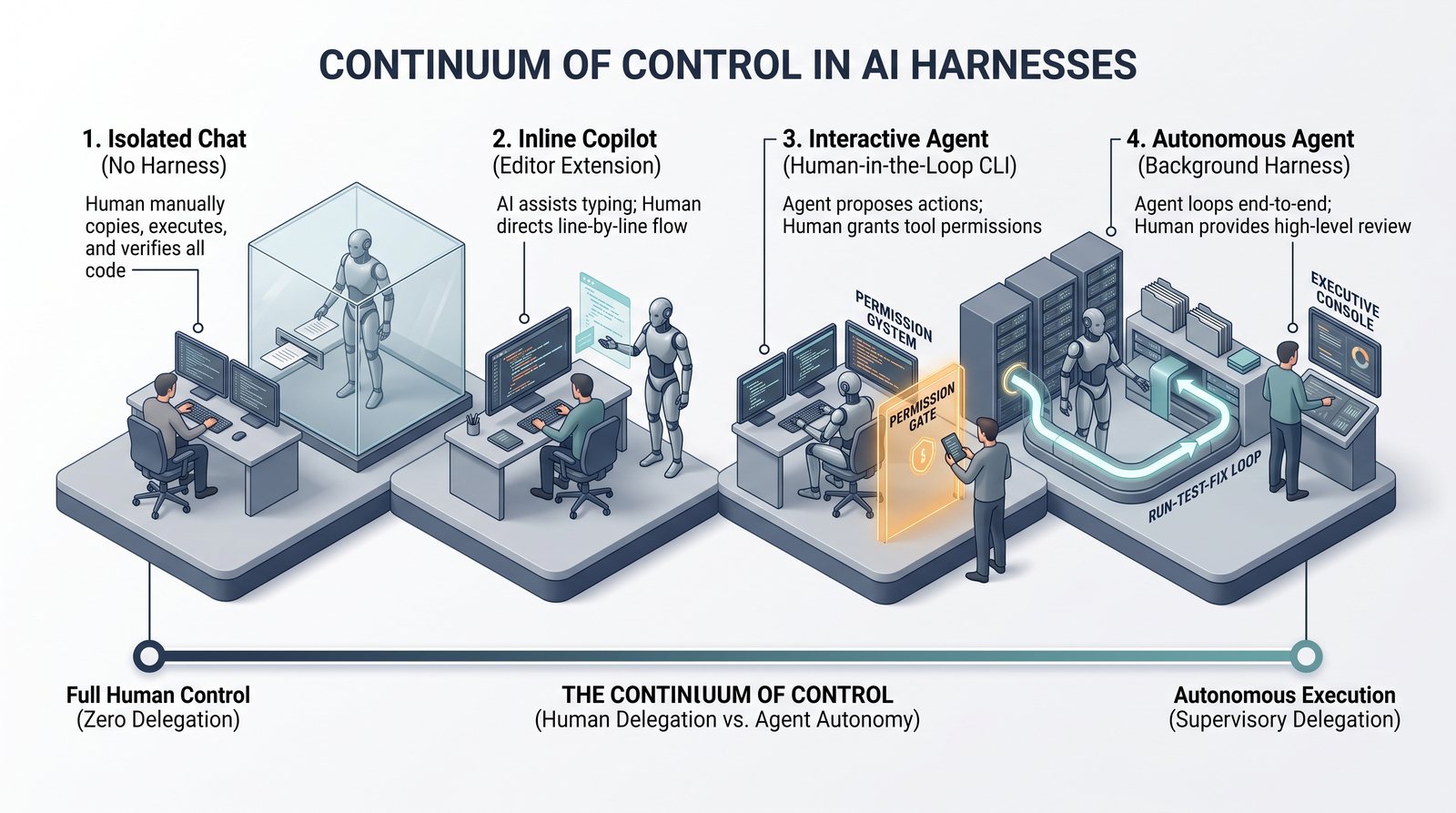
Different research tasks call for different levels of autonomy and supervision:
- Isolated chat: No harness integration. You copy code out manually, execute it in a separate terminal, and verify all output.
- Inline copilot: Suggests code completions directly inside your editor as you write, keeping control localized to each line.
- Interactive agent: Proposes concrete shell commands, file modifications, or script executions, pausing for your explicit confirmation before executing. This interactive model is the central focus of this workshop: it offers transparency, prompt approval checkpoints, and file-based steering.
- Autonomous agent: Executes multi-step pipelines independently in the background, presenting artifacts upon completion. This ranges from short-lived local background workers to persistent cloud agents (such as GPT Dots or Kiro Crew) running overnight or event-triggered workflows. This approach saves time on repetitive tasks, but requires strict sandboxing and steering constraints since you review work after execution.
Selecting a harness and model
- Begin with a command-line harness connected to a foundation model you can access through existing institutional agreements or API keys.
- Confirm institutional data privacy approvals before analyzing sensitive or proprietary datasets (Privacy and data handling).
- Store project conventions and procedures in plain-text files (
AGENTS.md, modular skills, and documentation). Plain files are portable across harnesses, preventing vendor lock-in (Memory).
Subscription vs. API access
Most agent harnesses support flat-rate monthly subscriptions or pay-per-token API endpoints. For a comparison of cost predictability, rate limits, and model access tiers, see Costs.
Cloud vs. local model deployment
While cloud-hosted models currently offer the highest reasoning and coding capabilities, foundation models can also run locally on dedicated GPU hardware. Local deployment provides total data residency and offline execution, making it an important option when institutional policies strictly prohibit transmitting data to external cloud services (Privacy and data handling).
Getting started
Installing an agent harness typically involves running a single package command or binary installer provided by the vendor. Step-by-step setup instructions are available on the setup page.
Next step: working safely with models and harnesses
With an understanding of what agency means (Agent vs. conversational chat), how an agent inspects reality (Orient the agent in a folder), how code serves as a universal protocol (What code can do), and how the harness mediates between the model and your machine, you have completed the conceptual foundation of Section 2: Meet your agent.
Because the harness transmits workspace context across network connections and grants the system permission to run commands locally, two immediate governance questions arise:
- Where does my research data go, and who has access to it?
- What prevents an agent from accidentally overwriting raw files or running destructive commands?
These questions lead directly into Section 3: Work safely, starting with Privacy and data handling.
Related
Agent vs. chat · Costs · Sandboxing and isolation · Privacy and data handling